Showing posts with label Programming. Show all posts

Sunday, 19 July 2015

Life Lately

Hey everyone. I can't believe it's already more than half way through July and I've only posted 2 (ok, this counts as 3) blog posts. Life has been quite busy lately. I had an epic birthday a few weeks ago now and feel so incredibly blessed that I was able to share an awesome pre-birthday day with both family and friends together - something that doesn't happen often when you live and work far from where you grew up.

At work, we had a pretty intense testing phase of our project a few weeks back (known as FAT - Factory Acceptance Testing) which ran smoothly. There were a few bugs and a few smaller features that we identified as useful to the client, which is normal for these types of projects. But we didn't find anything hugely wrong while we were testing, which is really great news for us. After 6 months spent putting together specifications and another 6 months developing what we had specified, it would have been worrying if we had found major issues. So, so far so good on that front.

Otherwise, Frosty and I have been busy carrying on with two online courses*. The one is a basic programming course and I would definitely recommend it to anyone who is interested in learning how to program but unsure of where to start. It teaches you how to program using the Python programming language and has great videos and explanations on the basics of programming concepts. Remember the Photo Renaming Program I mentioned a while back? Well, I used Python to program it, and in some of my spare time I've added in some extra features. I'm hoping in the next few weeks to be able to share the improved Photo Renaming program with you, so watch this space! While I'm at it, if you have a better name for it than "Photo Renamer" please leave a comment below, I'd love a slightly more pretty name!

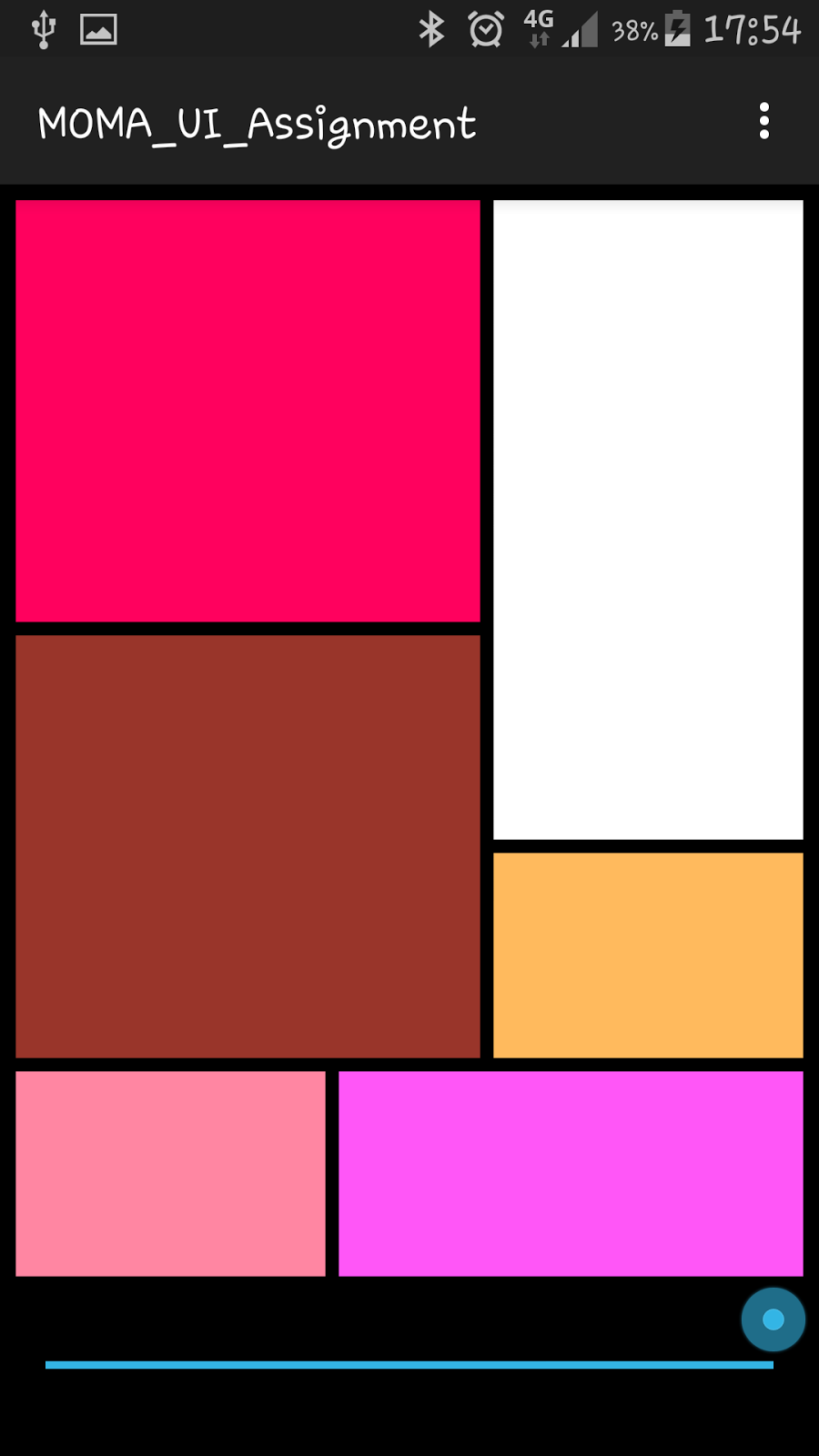
The other course we've been doing is really cool and I hope will be useful for future endeavours - it's an Android App programming course and this weekend our course project is due. We've had to create a simple app that changes squares of colours on the screen depending on the position of a slider. See in the two pictures above, how in the left image, the slider is on the left hand side and the right hand image, the slider has been slid all the way to the right hand side. I did that! And, those are screen shots from my actual phone. There's also a video that you can see, just click here. For most people, this probably wouldn't be that interesting or exciting, but I beg to differ! It's the start of actually being able to program an app, which is awesome! We've had to create apps from a blank canvas which has been a good way of consolidating the last few weeks worth of learning to make sure we actually understand what's going on in the course.

Keep an eye out for my second Quote of the Week which will be posted at some stage next week. It's a new feature that I'm starting to help keep me blogging more - so I hope you enjoy it! Here's the first one, for those who missed it. Don't forget you can follow me on Instagram as I will also be posting the quotes there.

Which is probably part of the reason that I haven't had as much time to dedicate to blogging as usual recently.


~~~~~ Follow Practical Cookie ~~~~~
~ Twitter ~ Facebook ~ Pintrest ~ Instagram ~

Saturday, 18 July 2015

Project Video Programming Mobile Applications for Android Handheld Systems

Video of final project for the course Programming Mobile Applications for Android Handheld Systems.

I added in an extra feature, just for fun - that of being able to change the colour of the top left block from red to blue, or blue to red.


~~~~~ Follow Practical Cookie ~~~~~
~ Twitter ~ Facebook ~ Pintrest ~ Instagram ~

Thursday, 18 June 2015

What is a MOOC?

Recently, Frosty signed up two programming courses via Coursera. Online learning has been around for a while, but there is a new wave of online learning and online courses. They're called MOOCs - which stand for Massive Open Online Course's and often these types of courses are free. Yes, you heard me right, FREE! Coursera offers courses from Arts to Engineering to Business to Law to Languages. Most of these courses are free, although from the looks of it, there are a few courses (in which you get a "Verified Certificate") that you would need to pay for. If you're looking to expand your knowledge on something, I would suggest you give them a try!

I thought I would keep Frosty company in a python programming course, which is aimed at beginners who are interested in learning how to program (of course, with a focus on Python). So far it's been a relatively simple intro to programming concepts, but I've been really impressed with the way in which the lecturer (Dr Chuck, as he refers to himself on twitter) has presented the information. He's one of the first online lecturers that I've felt a rapport with and he's simplified things down to the basics... Well, the basics from my point of view. Then again, I started learning to code in Grade 10 which was 10 years ago now!

The second course that Frosty and I are taking is a course that is, hopefully, going to teach us the basics of programming Android Apps. I have a feeling that this is going to be a lot more challenging, but I'm really looking forward to getting started and broadening my programming skills and knowledge, so watch this space, maybe you'll see a Practical Cookie app hit the Google Play Store in the not too distant future!


~~~~~ Follow Practical Cookie ~~~~~
~ Twitter ~ Facebook ~ Pintrest ~ Instagram ~

Tuesday, 24 February 2015

How to Rename Picture Files in Bulk Version 1

Development work over the weekend while I was checking that my program worked!
Over the weekend I told you that I had been working on a little project that I was almost ready to share with you and today I'm excited to announce that version 1.0 is finally ready! Now I need your help...

As you should by now know, I take a lot of photos. And I like having photos for a specific event labelled by name. So if I take 500 photos at my birthday party and I want to label them something along the lines of "Caths Birthday 1" all the way through to "Caths Birthday 500". I also want them to be sorted from lest recent photo at number 1 to most recent photo at number 500 (so that I can start looking through my pictures at number 1 and they follow the sequence of photos as they happened). It's also better for blogging to upload more descriptive photos than DSC_0010.jpg. 

I know some photo processing programs do this for you, but I wanted a way to do this by means of a small program dedicated to this. And so I decided to create a program to do this. I've called it "Bulk File Renamer", but if anyone has any better suggestions, please comment below!

I've decided that I want to give you access to this and so I've put this on a public google doc. If you would like to download this FREE program - please click on this link and download the folder named "Bulk File Renamer.zip".

To get started, follow my instructions below:

1. Download the zip file called "Bulk File Renamer.zip" if you haven't done this already.

2. Go to the downloaded zip file "Bulk File Renamer.zip" and right click on it. Select the option to Extract All and when the window pops up asking where you want to extract the files to, specify that you want to extract them to "C:\Program Files". You can also specify "C:\Program Files (x86)" if there is no Program Files folder.

3. Open the Bulk File Renamer folder that is now located in the Program Files folder and copy the file labelled "Bulk_Renamer_App - Shortcut" and paste it to your desktop.

4. Double click on the Bulk_Renamer_App - Shortcut and a screen like the one below should pop up. 


App to rename pictures in bulk

5.1 If you want to rename all pictures in your a particular folder, click the blue "Choose Folder" button and navigate to the folder of pictures you want to rename, when that folder is highlighted, click on OK. The blue button should now say "Folder: <your folder>" where <your folder> is the name of your folder.
App to rename pictures in bulk
After clicking on the blue "Choose Folder" Button
I navigated to my "Test Photos" folder.
I clicked on it once and then clicked on OK.
See my text has changed from "Choose Folder" to
"Folder: Test Photos".
App to rename pictures in bulk
After entering in your details and clicking on the
green "Rename" button, a window pops up telling
you when the action has completed and how
many files were renamed.
5.2. If you want to rename only certain pictures in a particular folder, click the blue "Choose Files" button and navigate to the folder of pictures you want to rename, select the individual pictures (hold down the "Ctrl" key to select more than one picture at a time) and then click on OK.


App to rename pictures in bulk
After clicking on the blue "Choose Files"
button, I selected 3 files I wanted to rename.
Note the text changes from "Choose Files"
to "3 files chosen" since I chose 3 files
that I wanted to rename
App to rename pictures in bulk
After entering in your details and clicking on the
green "Rename" button, a window pops up telling
you when the action has completed and how
many files were renamed.
6 In the "Text Rename" text box, enter in the description you would like all photos to be renamed to. (eg: December Holiday 2014, or 20150201 - Trip to KZN etc).

7. After performing action 5.1 OR 5.2
In the "Starting Number" text box, enter in the number to start at. This defaults to 1 if you leave this field blank. If you decide you rather want to rename these photos start at number 257, then type 257 into the text box.


8. Click the green "Rename" button. Once the program has finished renaming all your files, a notification box will pop up informing you once the file rename has been completed. If there is already a file of a particular name existing in the folder, it will not rename this file and will leave that file with it's original name and move on to the next file.

9. When you've finished all your photo renaming tasks, click the red "Quit" button, or the cross at the top right corner of the window to close the app.

Once you've done all of this, please let me know if it worked or not by commenting below, sending me an e-mail or posting on my facebook page. I would like to improve this, but I can only do this with your feedback. If there are any features that you think would be useful or beneficial, please mention those too.

The renaming facility should work on all files, however I haven't tested the "sort by date" functionality on non-image files. I'll be working on this on my next version of this program. If you test this out and it works, or doesn't work, please comment below to let me know (include what files you tested with - word, excel, powerpoint etc).


~~~~~ Follow Practical Cookie ~~~~~
~ Twitter ~ Facebook ~ Pintrest ~ Instagram ~

Thursday, 6 March 2014

The Winds of Change

I think the factory knew I was leaving last week. On Friday morning (my last day) myself and my team were greeted with a breakdown that had brought the line to a halt and I spent the morning of my last day trying to figure out exactly what went wrong... I even had to leave my team members fixing the problem so that I wouldn't be late for my own farewell breakfast that my boss had kindly organised for me! Unfortunately, many of my closest team members missed the breakfast due to them staying at the factory to fix the breakdown - such is the factory life. After breakfast and back at the factory again, I luckily got time to say goodbye to almost everyone I wanted to say goodbye to before I left.

I must say, I felt quite melancholy when I drove out the factory for the last time - in these last (almost) two years I've made a good name for myself and was reaching a point where I felt like I actually knew what I was doing (most of the time at any rate!) There's something comforting about going to do your job and actually knowing how to do it, as opposed to just winging it and hoping for the best. However, with that comfort level, there was also a level of of complacency and I think that if I had stayed in my previous company, I would have moved roles in the next little while anyway in order to expose myself to new challenges.

I've now completed my first few days at my new job and I'm still doing a lot of reading of documentation and teaching myself the syntax of a programming language called Python. And for those that are interested, it's not named after the snake, but rather after the Monty Python's Flying Circus comedy! There is going to be a lot to learn, but I'm definitely ready for the new challenges that I'm going to encounter at my new job. 

Red tulips with yellow edges
Keep an eye out for this picture in a later post!


~~~~~ Follow Practical Cookie ~~~~~
~ Twitter ~ Facebook ~ Pintrest ~ Instagram ~